ClawDance: AI Video Generator
iKame Applications - Begamob GlobalPhotography
4.728.00 Reviews
- Version
- 1.3.1
- Installs
- 10.00K
- Age Rating
- Everyone
Screenshots
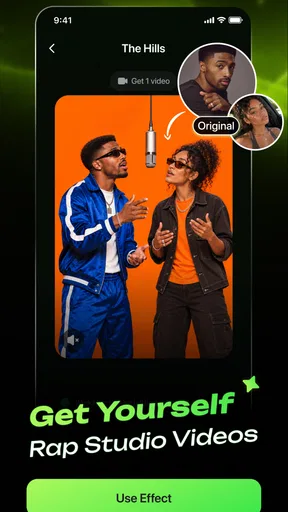
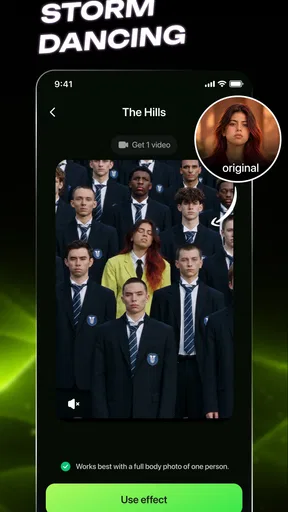
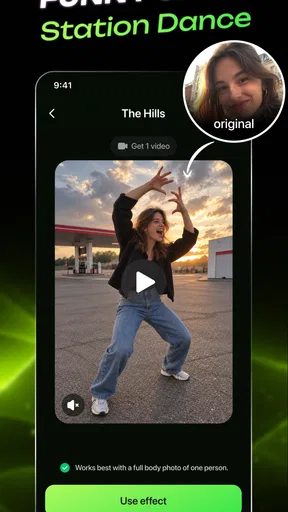
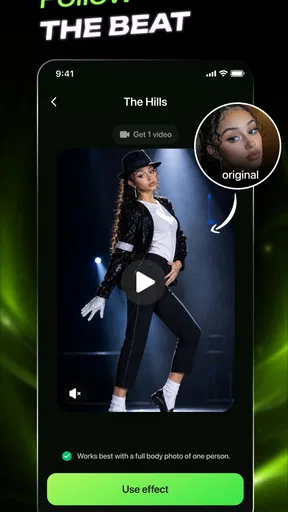
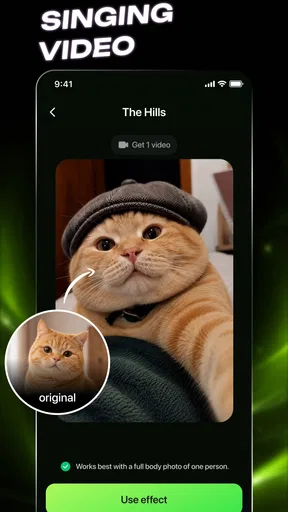
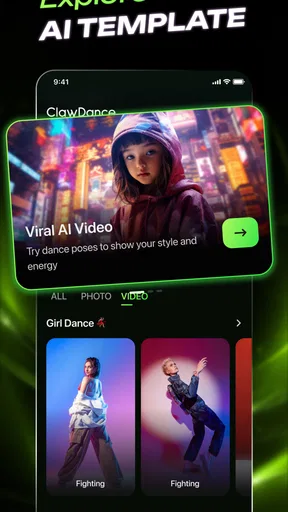
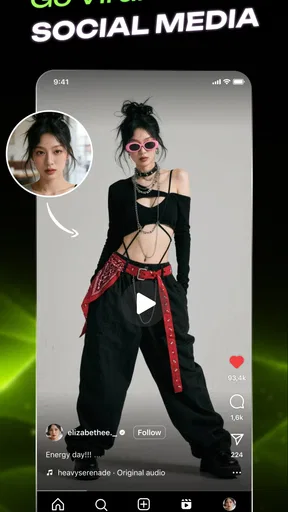
Our Review of ClawDance: AI Video Generator
 Analysis by Appyee
I approached ClawDance: AI Video Generator as a quick creative tool rather than a full replacement for a traditional video editor. Its focus is clear: turn an idea, image, or short piece of content into something animated and shareable with the help of AI. After spending time with it, I found the appeal is less about building a polished film from scratch and more about making a visual moment that feels lively enough for a social post, message, or personal project.
That makes it an interesting photography app, especially for people who already have still images they want to give more personality. The app is free to install, carries an Everyone age rating, and comes from iKame Applications - Begamob Global. It has reached over ten thousand installs and holds a 4.7 average from around one thousand six hundred ratings, which suggests that its simple creative idea is connecting with a real audience.
What using ClawDance feels like in everyday work
The first thing I noticed is that the app is built around immediacy. I do not open it expecting the layered control of a desktop editor. I open it when I want to experiment with movement, animation, and an AI-generated video without spending a long time preparing a timeline. That distinction matters because it sets the right expectation from the beginning.
A realistic use case would be a birthday photo sitting in my gallery that feels a little flat as a static image. Instead of opening a conventional editor, choosing a canvas, trimming clips, adding keyframes, and searching for an effect, I can use ClawDance to explore a more animated interpretation. If the result works, it is ready to become a fun message or a short social update. If it does not, the cost of trying is mainly the time spent generating and reviewing it.
The “ClawDance” identity gives the app a playful character, but I would not treat it as a tool for every type of video. It is most convincing when the desired result is short, visual, and attention-grabbing. A creator making a carefully structured tutorial, a product demonstration, or a long-form travel edit will probably feel limited compared with a conventional mobile editor that offers precise cuts, audio tracks, captions, and manual timing.
What I like is that the app lowers the barrier between a still image and a moving idea. Many people have photographs they enjoy but never turn into anything more because animation tools can feel technical. Here, the creative decision comes first: choose something worth transforming, decide what kind of visual energy you want, and then judge the generated result. That is a friendlier workflow than learning a complicated editing interface for a single small project.
Speed expectations before you start a project
AI video creation should be approached differently from applying a simple filter. Even when the interface feels quick, the actual generation step is the part that determines how long the experience takes. I found it more useful to think in terms of a short creative cycle: prepare the source, start the generation, inspect the result, and decide whether to keep refining the idea.
This means ClawDance is not ideal when I need a finished video immediately for a time-sensitive post. It is better when I have a few minutes to test an idea and accept that the first attempt may be a draft rather than the final version. The practical advantage is that I can make a visual decision without manually constructing every movement, but the trade-off is less predictable timing than a basic trim or filter.
For a smoother session, I would prepare the image before opening the generator. A clear subject with enough visual separation is easier to evaluate than a crowded photograph where it is difficult to tell what should receive attention. I also prefer to begin with one strong concept instead of trying to describe several unrelated ideas at once. That makes the review step more meaningful because I can judge whether the result matches a specific intention.
Another useful habit is to avoid treating every generation as precious. The point of an AI workflow is experimentation. If the first result feels awkward, I would rather change the source or simplify the idea than spend too long trying to rescue a weak starting point. This is one of the app’s strengths for casual creators: it encourages trying visual concepts that might never justify the effort in a traditional editor.
What happens during heavier creative sessions
The most demanding moments are naturally the ones where I generate several variations, work with visually busy images, or keep returning to the same project to compare alternatives. Those sessions require more patience than a quick photo adjustment because I am asking the app to do more than display a finished file. It has to process a creative instruction and produce something I can assess.
For that reason, I would use ClawDance in short batches. I might choose a small group of images, test one direction on each, and then keep only the strongest result. This is more efficient than repeatedly generating variations without a clear selection process. It also helps prevent the common problem of filling the phone with near-identical experiments that are difficult to compare later.
There is a less obvious trade-off here: convenience can encourage overproduction. Because the app makes animation feel approachable, it is easy to keep trying effects simply because they are available. I found the experience more satisfying when I decided beforehand what the video needed to communicate. For example, a family photo may only need gentle visual movement, while a humorous portrait can benefit from a more exaggerated treatment. The best result is not necessarily the most dramatic one.
I would also avoid starting a heavy session when the phone is already busy with other demanding tasks. That is not a criticism unique to this app; AI-assisted creation is simply a more intensive activity than browsing a photo gallery. Closing unused apps and giving the process a little breathing room is a sensible workflow, particularly on an older device that meets the minimum operating-system requirement but may not have the same resources as a newer phone.
Stability, mistakes, and recovering your workflow
Reliability matters more to me than a flashy first impression. A creative app can be enjoyable when everything works, but frustrating if an interrupted session forces me to reconstruct the same idea. With ClawDance, I would treat each completed result as something worth saving or exporting promptly rather than assuming every experiment will remain available exactly as I left it.
That simple habit protects the part of the workflow that matters most: the finished visual. It also makes it easier to compare results outside the app, especially if I am deciding which version suits a message or post. I prefer to separate creation from storage in this way, because an AI generator is primarily a place to make and judge content, not necessarily the only place where I want to keep it.
If a generation does not look right, I would recover by changing one variable at a time. I might use a cleaner image, simplify the intended motion, or choose a more obvious subject. Changing everything at once makes it difficult to understand what improved the result. This is a practical technique that is easy to overlook because the app feels automated, but the quality of the input still influences how useful the output is.
There is also a difference between an unsuccessful generation and an unreliable app. A result that does not match my idea is part of the creative process; a lost project or an unclear recovery path is a workflow problem. I would therefore recommend saving successful work as soon as it appears and keeping the original image separately. That gives me a fallback if I decide to try a different interpretation later.
The current version is 1.3.1, and I see that as a reason to keep expectations practical rather than assuming the experience will behave like a mature professional suite. The app has a focused purpose, and focused tools can be enjoyable precisely because they avoid unnecessary complexity. Still, anyone using it for important personal content should build in a small safety margin and avoid making a single unsaved session the only copy of a meaningful video.
Phone limits and the cost of convenience
ClawDance supports devices running Android 7.0 or later, so its compatibility reaches back to older Android phones. That is useful for accessibility, but compatibility alone does not tell me how comfortably every supported device will handle AI video creation. An older phone may open the app while still feeling less comfortable during repeated generation, previewing, or saving.
I would be especially careful with storage when working through many variations. Video files can become inconvenient to manage even when each individual project feels short. A tidy workflow helps: keep the original photo, review generated versions quickly, remove experiments that clearly do not work, and move finished clips to the place where I normally store important media.
Battery is another practical consideration during longer sessions. I would not begin a large batch of experiments just before leaving home with a low battery, particularly if the phone is older. The app is free to install, but free access does not remove the normal device costs of processing, storage, and time. Those are easy to ignore when the creative process feels playful.
The in-app purchase range runs from $9.99 to $89.99 per item, so I would pay attention to the purchase screen before committing to a paid action. The broad range means the financial side can matter more for frequent users than for someone who only wants to try the basic experience. My advice is to decide what kind of user you are first: an occasional experimenter can judge the free experience on its own, while a regular creator should consider whether repeated use justifies the available purchases.
The Everyone rating makes the app approachable for a broad audience, but that does not mean every generated result will suit every context. I would still review a video before sharing it, especially when the source image includes family members, children, or people who may not appreciate an unexpected animated treatment. The app can make creation easier, but the responsibility for choosing and sharing the final result remains with me.
How it compares with ordinary mobile editors
Compared with a standard video editor, ClawDance is more idea-driven and less manual. A traditional editor is usually the better option when I need exact timing, carefully placed text, controlled transitions, multiple audio elements, or a predictable sequence. Those tools reward patience and precision. They also make it easier to reproduce the same edit consistently.
ClawDance is more appealing when the starting point is a photograph and the goal is to discover a movement or style without building it frame by frame. That makes it closer to a creative shortcut than a complete editing workstation. I would use it before a conventional editor when I want to find a visual direction, then move to a more detailed tool if the project grows beyond a short social clip.
It also differs from a basic photo-animation app because the AI element changes the relationship between input and output. A simple animation tool often asks me to define the movement directly. Here, the attraction is allowing the app to interpret the creative request. That can produce a more surprising result, but it also means I give up some control. If consistency is more important than novelty, a manual tool may serve me better.
For social users, the choice comes down to effort versus control. ClawDance wins when I want a fast route from an existing image to something more expressive. A familiar editor wins when I already know exactly what the final video should look like. Neither approach is universally better, and I would not recommend replacing a dependable editor if precise production is already part of someone’s routine.
Who will get the most from it
I think the best audience is someone who enjoys experimenting with photos but does not want to learn a complicated animation workflow. It is also a good fit for casual creators who need a fresh way to present an image, families making playful memories, and social users who prefer a distinctive visual over a plain still post.
It can be useful for brainstorming as well. I might have a photo for a small project but no clear idea for how to present it. Generating an animated interpretation can reveal whether the image has enough personality to carry a short video. Even if I do not use the exact result, the experiment may help me decide what mood, framing, or subject deserves attention in a more polished edit.
I would skip it if my priority is professional-level control, repeatable motion, detailed audio editing, or a long timeline. I would also hesitate if I dislike trial and error. The app reduces manual work, but it does not remove the need to judge the output. Someone who wants every movement to be deliberate may feel more comfortable with keyframes and conventional editing controls.
People with older phones should approach it with reasonable expectations. The Android requirement is broad, but the most comfortable experience will depend on the individual device and how much other work it is doing. If storage is nearly full or the battery is already weak, I would clean up first rather than blaming the app for a session that the phone cannot comfortably support.
My practical workflow for better results
I would begin with a small, focused source image rather than a crowded group scene. The subject should be easy to recognize, and the visual goal should be simple enough to explain in everyday language. This gives the generator a clearer starting point and gives me a fairer way to evaluate the result.
Next, I would make one generation, watch it all the way through, and ask a specific question: does the movement improve the image, or is it only adding activity? That question prevents novelty from becoming the only measure of quality. A restrained result can be more useful than an energetic one if I am preparing something to send to relatives or use in a personal album.
For repeated attempts, I would change only one part of the idea at a time and keep the best version outside the app. I would name saved files by the source image and the creative direction, rather than leaving a folder full of indistinguishable clips. This small organizational step becomes valuable when several variations look similar at first glance.
Finally, I would decide where the video is going before making too many versions. A clip intended for a private message does not need the same polish or restraint as one intended for a public post. Knowing the audience helps me choose between a playful experiment and a more natural-looking animation, and it keeps the app’s creative freedom from turning into unnecessary editing time.
Performance verdict and final recommendation
My overall impression is that ClawDance succeeds when I use it as a focused AI creativity tool, not as an all-purpose video studio. Its strongest quality is the way it invites me to turn a still image into a more active visual without requiring a long manual setup. The experience feels approachable, and the free installation makes it easy to decide whether that style of creation fits my habits.
The limitations are equally important. Generation is not the same as instant editing, repeated experiments can place greater demands on the phone, and the results may require selection rather than immediate sharing. Storage, battery, and careful saving become more important during heavier use. The optional purchases, ranging from $9.99 to $89.99 per item, also mean frequent creators should think about their usage before spending.
For me, the app is worth trying when I have a good photo and want to explore a short, playful video idea quickly. I would recommend it to a friend who enjoys visual experimentation, especially someone who finds conventional editors intimidating. I would not recommend relying on it alone for a structured production where timing and repeatability matter more than surprise.
The best reason to use ClawDance is not that it eliminates creative decisions, but that it makes the first decision easier: take an image you already care about, give it a clear direction, and see whether motion adds something meaningful. Used that way, it is a practical and entertaining addition to a mobile photography workflow rather than a replacement for every other editing option.
Verdict
Strengths of ClawDance: AI Video Generator
- Creates short AI videos from simple text prompts.
- Offers creative effects suitable for social media content.
- Easy interface for beginners with little editing experience.
- Generates multiple visual styles for experimenting with ideas.
- Convenient mobile workflow for creating videos anywhere.
Limitations of ClawDance: AI Video Generator
- AI results can vary and may not match the prompt precisely.
- Rendering times may increase for complex or longer videos.
- Some advanced tools or styles may require a subscription.
- Generated clips can contain visual glitches or unnatural motion.
- A stable internet connection is needed for most generation features.
Other Releases by iKame Applications - Begamob Global
View All
Word Document: DOCX, PDF, XLSX
Productivity4.4

AI Cleaner: Clean up Storage
Tools4.4

TV Remote Control for Smart TV
Tools4.5

OneSearch: DeepSearch Finder
Productivity4.2
Similar Picks in This Category
View All
Google Photos
Google LLC4.4

Gallery
Google LLC4.2

Picsart AI Photo Editor, Video
PicsArt, Inc.3.9

B612 AI Photo&Video Editor
SNOW Corporation4.1

BeautyPlus-Selfie Photo Editor
PIXOCIAL TECHNOLOGY (SINGAPORE) PTE. LTD.4.5

Remini - AI Photo Enhancer
Bending Spoons4.1
Frequently Asked Questions
What is ClawDance: AI Video Generator and what can it do?
ClawDance: AI Video Generator is an AI-powered creative app designed to turn ideas, images, or written prompts into short videos. It can be useful for creating social media clips, animated portraits, promotional content, and experimental visual effects without requiring traditional editing skills. The available tools, video styles, export options, and generation quality may vary depending on the app version, device, and account plan.
How do I create a video with ClawDance?
After opening ClawDance, users generally begin by selecting an image, entering a text description, or choosing one of the available templates or effects. The app then processes the request using its AI system and generates a video preview. Clear prompts and high-quality source images usually produce better results. Generation time can depend on video length, server traffic, internet speed, and whether the selected feature requires premium processing.
Is ClawDance: AI Video Generator free to use?
ClawDance may be available to download for free, but some features can be limited by credits, advertisements, subscriptions, or in-app purchases. Before generating multiple videos, check the pricing page and the terms shown inside the app, since AI processing, high-resolution exports, premium templates, and watermark removal may require payment. App-store listings and current in-app notices should be treated as the most accurate source for present pricing.
What kind of photos and prompts work best in ClawDance?
For more consistent results, use sharp, well-lit photos with the main subject clearly visible and avoid images that are heavily cropped, blurry, or obstructed. Prompts should describe the subject, movement, camera style, mood, and setting in simple language. Results can still vary because AI video generation is not perfectly predictable. Faces, hands, text, complex backgrounds, and fast motion may sometimes appear distorted or inconsistent.
Is it safe to upload personal photos to ClawDance?
Users should review ClawDance’s privacy policy and permission requests before uploading personal, family, work-related, or sensitive images. AI video services may need to process content on remote servers, so avoid submitting confidential material unless you understand how it is stored, used, and deleted. Also make sure you have permission to use photographs of other people and remember that generated content may be subject to copyright, publicity, or platform-specific rules.
